How to Increase Subscription Licenses

Introduction
This article explains how to increase the number of licenses for an existing subscription. If you already have an active subscription, you cannot purchase a new license. Instead, you must modify your existing subscription to increase the license count.
In this article:
Prerequisites
Before proceeding, ensure you have:
- An active subscription in your account
- Appropriate permissions to modify subscriptions
- Access to the Subscriptions tab in your dashboard
Step-by-Step Process
Access Subscriptions Tab
- Navigate to the Subscriptions tab in your dashboard
- All subscriptions are located under this tab, where they can be managed and edited
Select Subscription
- Choose the subscription you want to modify from the list
- Click on the subscription name to open the subscription details

Figure 1: Subscription list showing available subscriptions
Edit Subscription
- Select the Edit button to modify your subscription
- The system will prompt you to choose when the changes should apply
Scheduling Changes
When selecting the Edit button for a subscription, you can choose when you want the changes to apply:
- Now - This option enables you to make changes immediately
- Custom date - This option allows you to select any future date. On the selected date, your subscription quantity will be changed
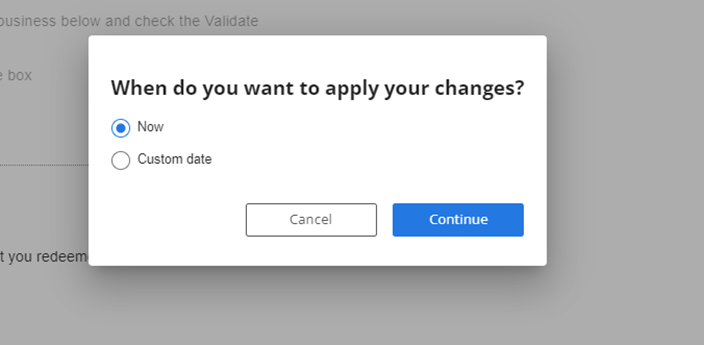
Figure 2: Edit subscription dialog showing timing options
Completing the Update
- Make the necessary adjustments to your subscription quantity
- Select Save to apply your changes
- A pop-up window with Terms & Conditions will appear
- Press the "I agree" button to continue and finalize the changes
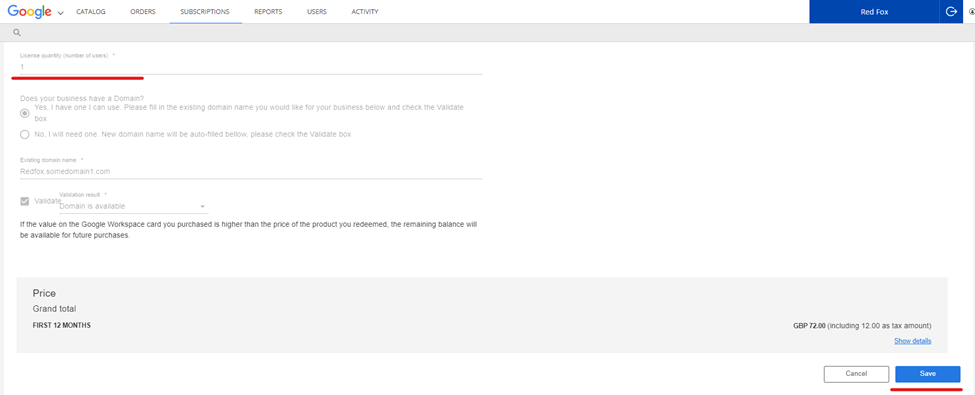
Figure 3: Terms & Conditions confirmation dialog
Limitations
- You cannot purchase additional licenses as a separate subscription if you already have an active subscription
- Changes scheduled for future dates cannot be modified once confirmed
- Immediate changes may affect your current billing cycle
Summary
Increasing subscription licenses is a straightforward process that involves accessing your existing subscription through the Subscriptions tab, selecting the Edit option, choosing when to apply changes, and agreeing to the terms and conditions. Remember that you cannot purchase new licenses if you already have an active subscription - you must modify the existing one instead.
For additional assistance, contact support at support@appxite.com
Was this article helpful?
Articles in this section
- Add add-on subscriptions when purchasing
- Adjust renewal dates based on commitment period
- Azure Subscription Role Assignments within Tier 2 Seller and Indirect Provider Model
- Cancellation Policies
- Change subscription names
- Channel Subscription Management overview
- How do I suspend a Subscription for the Customer?
- How Do NCE Trial Subscriptions Work?
- How to change the price on existing Subscription?
- How to change the quantity of subscription licenses
Add comment
Please sign in to leave a comment.