How to purchase Adobe High Growth offers?

Introduction
This article explains how to purchase Adobe High Growth offers through the VIPMP (Value Incentive Plan Managed Partner) program directly in the Platform. High Growth offers provide volume-based discounts for Adobe Acrobat products based on minimum order quantities (MOQ) and require a three-year commitment (3YC). These offers are designed for customers who are making new purchases or significantly expanding their existing Acrobat Pro seats, replacing the previous High Volume Discounting program (17-23 levels) that existed in VIP. This guide is designed for Seller Admins and end-customers who want to understand the qualification requirements and purchase process for these special discount tiers.
In this article:
What are High Growth offers?
High Growth offers are special pricing tiers based on Minimum Order Quantity (MOQ) that provide discounted rates for Adobe Acrobat products. These offers are specifically designed to support customers who are either making substantial new purchases or significantly expanding their existing Acrobat Pro seat count.
Key features of High Growth offers
High Growth offers operate on an MOQ-based pricing model where the purchase quantity determines the discount rate. Once you qualify for a High Growth offer, all subsequent purchases will continue to receive pricing based on your established MOQ tier, providing consistent savings throughout your commitment period.
Available MOQ tiers
Adobe offers three High Growth tiers based on minimum order quantities:
- MOQ 100: Entry-level High Growth tier requiring a minimum of 100 seats
- MOQ 250: Mid-level tier requiring a minimum of 250 seats
- MOQ 500: Highest tier requiring a minimum of 500 seats
Each tier provides progressively better discount rates, rewarding larger volume commitments.
Who is eligible for High Growth offers?
High Growth offers are available to specific customer types who meet Adobe's qualification criteria.
Customer type requirements
You must be one of the following customer types to qualify:
- Enterprise customers using Acrobat Pro
- Team customers using Acrobat Pro
Market segment requirements
High Growth offers are available in these market segments:
- COM (Commercial customers)
- GOV (Government customers)
Three qualification criteria
To be eligible for High Growth offers, you must meet all three of the following requirements:
1. Enrollment in the 3YC program
Customers must be enrolled in Adobe's three-year commitment program. This program requires you to commit to a specific quantity of seats for three years, providing Adobe with revenue predictability in exchange for volume discounts.
2. MOQ requirement
You must commit to a minimum order quantity of 100 or more seats. However, the specific MOQ tier you can select depends on your current seat count at renewal.
3. MCQ requirement
The Minimum Commit Quantity (MCQ) – the number of seats you commit to – must be greater than or equal to the number of subscriptions you have at the renewal date. This ensures you're maintaining or growing your seat count rather than reducing it.
Eligibility based on current seat count
Your current number of Acrobat Pro and Acrobat Standard seats combined determines which MOQ tiers you can select. Adobe groups Acrobat Standard and Acrobat Pro together when calculating eligibility.
| Current Seats at Renewal (Acrobat Pro + Standard) |
Eligible MOQ Tiers | Minimum Commit Quantity Required |
|---|---|---|
| ≤ 50 seats | 100, 250, or 500 | 100+ |
| ≤ 125 seats | 250 or 500 | 250+ |
| ≤ 250 seats | 500 | 500+ |
Example: If you currently have 110 combined Acrobat Pro and Standard seats, you can choose either the MOQ 250 or MOQ 500 tier. However, if you select MOQ 250, you must commit to at least 250 seats.
New versus existing customers
High Growth offers are available to both:
- New customers who are purchasing Adobe Acrobat products for the first time
- Existing customers who want to expand their current license count and qualify based on their existing seat numbers
Prerequisites for High Growth offers
Before you can purchase High Growth offers in the Platform, you must meet specific requirements set by Adobe.
Customer eligibility verification
High Growth offers are only available for customers who:
- Are registered directly through VIPMP (not migrated from the legacy VIP program)
- Are Enterprise or Team customers using Acrobat Pro
- Operate in the COM (Commercial) or GOV (Government) market segments
- Have enrolled in a three-year commitment (3YC) program
- Meet the minimum order quantity requirements for their desired discount tier
- Have a combined Acrobat Pro and Standard seat count that qualifies them for their chosen MOQ tier
Understanding minimum order quantities
Adobe High Growth offers are organized by MOQ tiers. Each tier requires a specific minimum seat count and provides corresponding discounts:
Checking current seat count
To determine your eligibility, review your current seat count for qualifying Adobe products. For example, if you have an active order for offer 65304886CA01A12 under customer account 1005280723, you can verify your current quantity in the Subscription details page.
Enrolling in the three-year commitment
Before purchasing any High Growth offer, you must enroll in Adobe's three-year commitment program.
Step 1: Attempt to place a High Growth order
Navigate to the Catalog and select your desired High Growth offer. When you attempt to place an order without 3YC enrollment, the system will display an error message:
This error confirms that you need to enroll in the 3YC program first.
Step 2: Purchase the 3YC offer
Learn more here: Adobe 3-years Commitment
- Return to the Catalog section
- Locate the 3-year commitment for licenses offer
- Review the commitment terms and conditions
- Complete the order process
The order will appear in your Orders list with status "Provision started" and show "+100 PerConfiguration" in the order details.
Step 3: Accept the terms
After the 3YC order is provisioned, you must accept the terms as an end-customer:
- Navigate to the commitment confirmation page
- Review all terms and conditions carefully
- Customer needs to accept 3YC Request in Adobe Admin Console
Once terms are accepted, you can proceed to purchase High Growth offers.
Placing your first High Growth order
After successfully enrolling in the 3YC program, you can place orders for High Growth offers.
Step 1: Select the appropriate MOQ offer
- Navigate to Catalog → Adobe
- Locate the High Growth offer that matches your intended commitment quantity
- Select the offer to view details
Step 2: Configure your order
Complete the order form with the following details:
- Admin Account: The email address for the Adobe administrator will be auto selected
- Action: Select Place order
- License Quantity (1 User): Enter the minimum quantity required for your chosen MOQ tier (for example, 100 for the 100-seat tier)
- Level: The system will automatically display the appropriate level (for example, "Level 14 (65304521CA14X12)")
Step 3: Review and confirm
- Review all order details carefully
- Place order: How to place an order for Adobe Offer?
- Wait for order confirmation
After the order is processed, your subscription will be created with the High Growth pricing level.
Managing renewals and upgrades
High Growth subscriptions include automatic renewal features that maintain your discount tier.
Understanding renewal codes
By default, each High Growth subscription is assigned a renewal code that corresponds to your MOQ tier. For example:
{
  "subscriptionId": "7e406e11b24b418e666dfa271a229aNA",
  "offerId": "65304521CA01A12",
  "currentQuantity": 100,
  "usedQuantity": 32,
  "autoRenewal": {
    "enabled": true,
    "renewalQuantity": 100,
    "renewalCode": "MOQ_100"
  }
}
This configuration ensures your subscription automatically renews at the same pricing level on the renewal date (for example, 2026-10-31).
Switching to higher MOQ tiers
You can upgrade to a higher discount tier by committing to a larger quantity during your subscription period.
Step 1: Request a new commitment
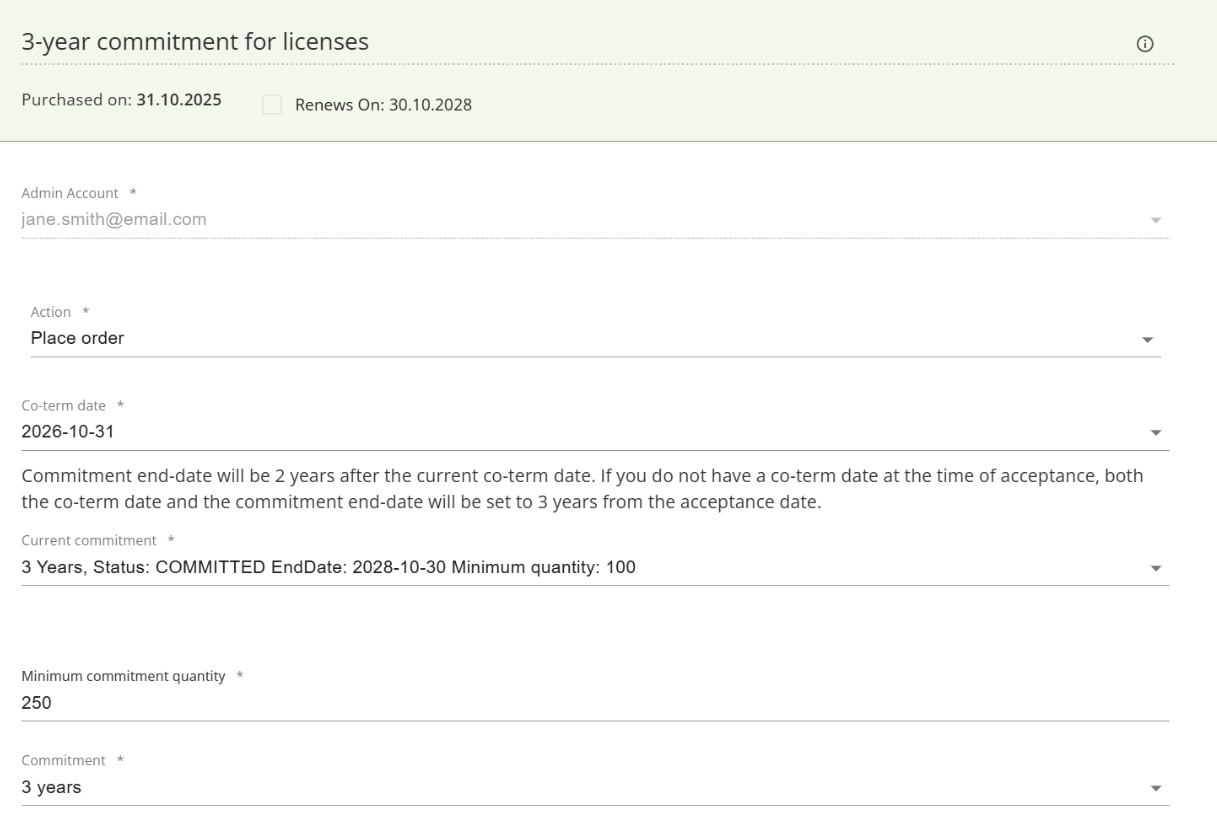
- Navigate to your existing 3-years commitment for licenses subscription
- Enter the new minimum quantity (for example, 250 for the 250-seat tier)
- Save
The system will display commitment details, including:
- Purchased on: Date of the new commitment
- Renews On: New renewal date (typically 3 years from acceptance)
- Current commitment: Status showing "COMMITTED" with end date and minimum quantity
Step 2: Accept the new commitment
As an end-customer, you must accept the new commitment terms before it takes effect.
Step 3: Place orders using the new MOQ offer
After accepting the new commitment, place orders using the appropriate High Growth offer for your new tier:
- Navigate to Catalog
- Select the High Growth offer matching your new MOQ (for example, "High Growth 250")
- Complete the order form:
- License Quantity: Enter the new commitment quantity (for example, 250)
- Level: Verify the correct level is displayed (for example, "Level 14 (65304521CA14Y12)")
Pay attention for wished MOQ to match with offer external id (Level X, Y, Z).
Step 4: Verify the order level
After placing your order, check the Cancellation policy section in the subscription details to confirm the correct level was applied. The policy will display:
- The level identifier (for example, "65304521CA14X12")
- The vendor order ID
- The order type (RENEWAL)
- Cancellation window dates
Mid-cycle quantity changes
If you need to add seats mid-cycle (between renewal dates), the Adobe system will calculate and apply the appropriate level based on your total seat count. However, note the following:
- Adding seats through the subscription edit page may maintain the previous offer ID on the subscription
- The actual pricing level returned by Adobe will be based on your current commitment and total quantity
- Always verify the applied level in the cancellation policy section after making changes
Limitations
When working with High Growth offers, be aware of the following restrictions:
- Renewal code changes: It is not supported to change or remove renewal codes through the user interface. Contact AppXite support for assistance.
- Scheduled renewals: It is not supported to schedule new subscriptions for renewal through the platform.
- Offer ID persistence: When switching to a different MOQ tier, the subscription may retain the previous offer ID in the system, even though the correct pricing level is applied by Adobe.
Summary
Adobe High Growth offers provide significant volume discounts for Enterprise and Team customers purchasing Acrobat Pro products in the commercial and government market segments. These offers replace the previous High Volume Discounting program and are based on Minimum Order Quantities (MOQ) of 100, 250, or 500 seats. To successfully purchase High Growth offers, you must be enrolled in the three-year commitment program, meet the MOQ requirements based on your current seat count, and ensure your committed quantity meets or exceeds your subscriptions at renewal. Once enrolled, select the appropriate MOQ tier for your needs and place orders using the correct High Growth offers from the catalog. Always verify the applied pricing level in your subscription details and contact support for any renewal code modifications.
Was this article helpful?
Articles in this section
- Adobe Vendor Integration overview
- Adobe seller guide
- How to Place an Order for Adobe Offer?
- Adding/Updating Subscription From Adobe Admin Console
- How to Change the Adobe Reseller?
- Adobe self-service APIs
- Adobe Industries
- Adobe 3-Year Commitment
- How do Adobe price levels work on the Platform?
- How to apply Adobe promotion codes
Add comment
Please sign in to leave a comment.