How to set up automated Invoice sending in Business Central

Introduction
This article guides you through configuring automated invoice sending in Business Central. You'll learn how to set up custom email body layouts for PDF invoices and configure language settings for customers. This ensures invoices are automatically formatted and sent in the appropriate language based on customer preferences.
In this article:
Setup Email Body Layout for Custom PDF Invoice
To configure the email body layout for your custom PDF invoices, follow these steps:
- Open the Report Selection - Sales page and select Invoice in the Usage dropdown field.
- Check mark the Use for Email Body field.
- Click on the Email Body Layout Description field to open the Custom Report Layouts page.
- Click on the three dots [...] to open the menu and select New > New...
- Toggle on the Insert Word Layout switch and click OK on the Edit - Insert Built-in Layout for a Report page.
- Click on the three dots [...] and select Layout > Import Layout in the menu.
- Select the Word document related to modifying the report and click Open.
- Click OK in the Custom Report Layouts page.
- Close the Report Selection - Sales page.
Add a Language
To add a new language for invoice sending:
- Open the Languages page.
- Add a new record.
- Fill in the Code and Name fields.
- In the dropdown of the Windows Language ID field, select the appropriate language from the list.

Update Customer Language Code
After adding the language, you need to assign it to specific customers:
|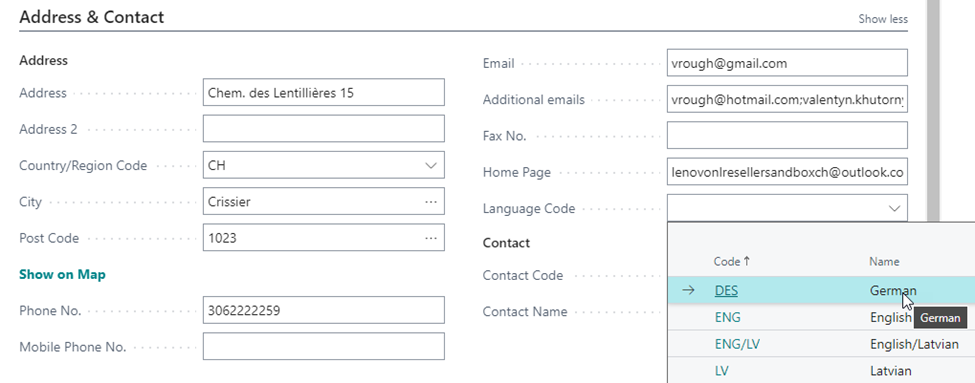
- Open the Customer Card for the relevant customer.
- In the Address & Contact section, locate the Language Code field.
- Select the appropriate language code from the dropdown menu (for example, DES for German).
- Save the changes to the customer record.
The system will now use this language setting when sending automated invoices to the customer.
Summary
This article provided step-by-step instructions for setting up automated invoice sending in Business Central. By configuring custom email body layouts and assigning language codes to customers, you can ensure that invoices are automatically formatted and sent in the appropriate language. This streamlines your billing process and improves customer communication.
Was this article helpful?
Articles in this section
- Handling errors in Business Central
- How to add a new Vendor in the Resource Groups list in Business Central
- How to assign users with Email Policies on Business Central
- How to automate Customer onboarding in Business Central
- How to brand the Organization in Business Central
- How to change the Distributor's company address in Business Central
- How to correct a Business Central invoice with incorrect tax for tax-exempt sellers
- How to fix invoice Posting Date in Business Central
- How to fix Posted Sales Invoice numbering issue in Business Central
- How to monitor automatic sending of sales documents in Business Central
Add comment
Please sign in to leave a comment.